

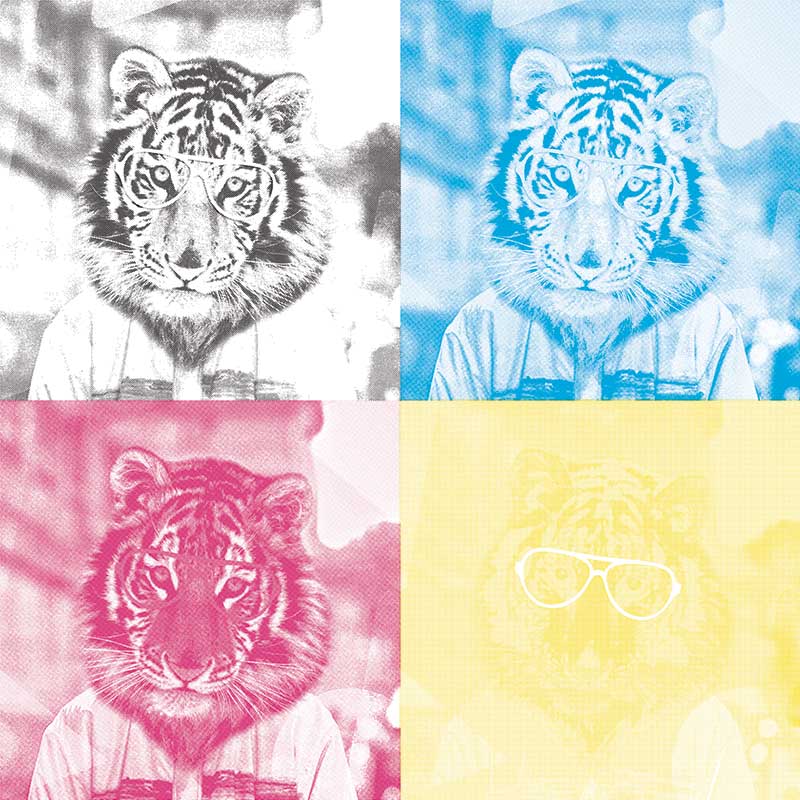

Free CMYK Color Separation Software
Two free ways to separate your artwork for screen printing and DTF transfers: color separation software that runs in your browser with nothing to install, or the classic Photoshop action you can download from this page. Both are free, with no signup and no watermark.
New: separation software that needs no install. Our browser-based color separation software builds CMYK, spot color or index separations, generates a white underbase with adjustable choke, and screens every channel at its own halftone angle. Nothing is uploaded — the whole thing runs locally in your tab.
Open the free color separation tool →
Which separation method should you use?
The right method depends on the artwork, not on the printer. Picking the wrong one is the most common reason separations look fine on screen and print badly on fabric.
- Index separation — reduces the art to a fixed number of solid inks. Best for flat vector designs, cartoon work and most t-shirt graphics. Cheap to print and very forgiving.
- Spot color separation — you choose the exact inks. Right when the design must match brand colors, or when you are printing on a press with named inks.
- CMYK process separation — four-color process for photographic artwork and complex gradients. Needs halftone screens at rosette angles and good registration.
Halftone angles for CMYK separation
Process color only prints through a halftone screen, and the angles are not arbitrary. The standard rosette set is cyan 15°, magenta 75°, yellow 0° and black 45°. Yellow sits at 0° because it is the least visible ink, so its screen clashing with the others matters least.
For DTF and garment printing, keep the screen at 30 LPI to start. Film and adhesive powder both spread the dot, so finer screens close up and print as solid ink. The online tool lets you change LPI and see the result immediately, instead of round-tripping through Photoshop for every test.
White underbase and choke
On dark garments the colors need a white base underneath or they sink into the fabric. The base must be slightly smaller than the artwork — that shrinking is called choke. Without it, a sliver of white peeks out around every edge as a halo, especially once registration drifts.
Two pixels of choke suits most designs. The browser tool generates the underbase and applies the choke for you; in Photoshop you contract the selection before filling the base layer.
The free Photoshop action (CMYK)
The download on this page is a Photoshop action that splits an image into four CMYK layers, ready for output. It is the fastest route if you already own the software and want to stay inside Photoshop and want the separation inside your existing file.
How to use it:
- Double click the action file, then press ALT+F9 in Photoshop to open the Actions panel.
- Drag and drop a single high-resolution image into Photoshop, flattened to one layer.
- Press play to run the action, and do not open other files while it is running.
- The result is one file with four layers, each CMYK color on its own layer.
Requires Adobe Photoshop. If you do not have it, use the free browser separator instead — it needs no install and runs on any modern browser, including on a Mac.
Preparing files for screen printing and DTF
- Resolution: 300 DPI at the size you will actually print. Separating a low-resolution file only spreads the problem across four channels.
- Color mode: work in RGB and let the separation handle the conversion. Converting to CMYK early throws away color you cannot get back.
- Format: PNG with real transparency. JPEG cannot hold transparent pixels, so any knockout is lost the moment you save.
- Background: knock it out before separating. Otherwise the background becomes one of your inks and the underbase is generated across the whole sheet.
- Test print: always run one transfer on scrap fabric before committing to a gang sheet.
Need artwork to separate?
Browse print-ready t-shirt designs with layered AI, EPS, SVG and 300 DPI PNG files included, all under a commercial licence. Or pick up a free design to test your separation setup first.
Included file types
PSDLicense type – Extended License
Report copyright complain
Reviews
Be the first one to review this item